What Is a Computer Program?
Functions are the parts. A program is what you get when you call them in the right order.
What you'll learn
- Programs
- Function Calls
- If / Else
- Loops
In this video
Hey, remember functions? Like that little box with knobs we talked about? Each function does just one thing. That's kind of its superpower, but also... a little lonely. Watch what happens when we put a bunch of them together.
Look at these three. Add only knows how to add. Greet only knows how to say hi. And save? It just writes stuff down. That's it. Tiny little workers, each one really good at exactly one job.
Here's the thing though. Real stuff in life? Even something simple like making a sandwich, it's never just one move. You gotta grab the bread, spread the butter, stack the cheese... a whole little list of steps.
Now look. See how each recipe step turns into its own little function? Get bread, spread butter, add cheese, close, eat. One after the other, in a line. By themselves they're nothing special. Lined up like this? You've got lunch.
And right there, that chain of little functions calling each other? That has a name. We call it a program. Just a bunch of small pieces, lined up in the right order, working together to do something bigger.
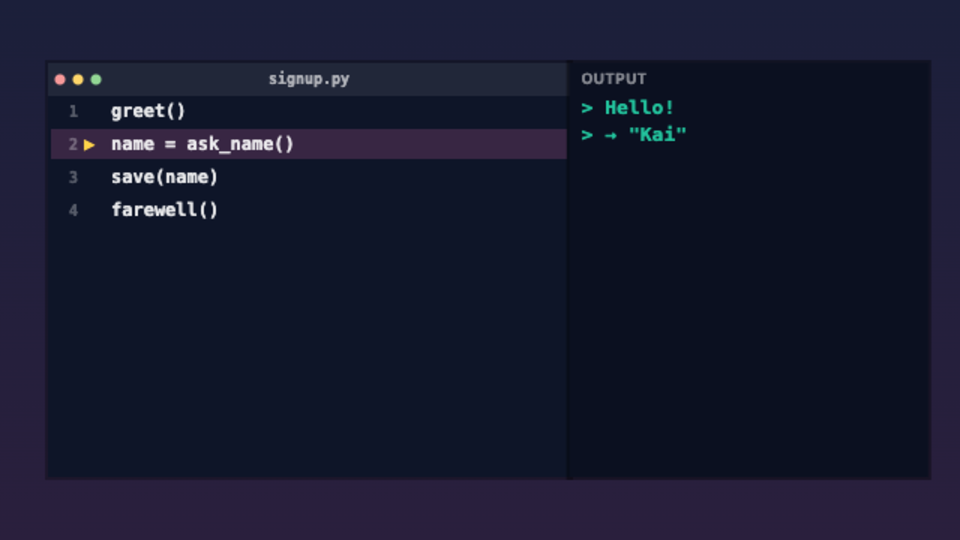
Okay, here's an actual program. Don't be scared by the code. Every line is just a function name. Greet says hi, ask_name asks for your name, save remembers it. You can already picture what each one does, right?
Watch the little arrow. The computer reads top to bottom, just like you read a book. One line, then the next, then the next. It never gets bored, never skips ahead, never goes "eh, I'll do that later." Exactly in order, every time.
Your turn now. Hit the next button and BE the computer. Run one function at a time and watch the output show up on the side. Take it slow, see what each line actually does.
Programs don't always go in a straight line. Sometimes they hit a fork in the road. If it's after six pm, call the evening function. Otherwise, call the morning one. That word "if" lets the program pick a path based on what's going on.
Try this. Drag the slider and change the hour. Watch the program flip between calling say_evening and say_morning. Same code, different choice — just because the time changed.
And sometimes you wanna do the same thing over and over. Like showing every photo in your gallery. Watch — the program calls show_photo again and again, once for every picture. That's called a loop. Way easier than writing the same line a hundred times.
Now look — we've got all three at once. A loop going through every friend, an if checking who's online, and a function call to send the message. Order, branch, repeat. Mix those three together and you can build pretty much anything.
Every single app on your phone? Messages, Camera, your favorite game, even ChatGPT — they're all just this. Tons of tiny functions, getting called in a smart order. That's the whole secret.
So let's pull it all together. A program is just functions called in a clear order. If statements let it pick. Loops let it repeat. And the computer follows your steps exactly — it never wings it, never improvises. That's actually its superpower.
But wait — there's one piece missing. How does a program actually notice when you tap a button? And how does it talk back to you on the screen? That's what we'll dig into next. See ya there.
Topics
Ready to try it yourself?
What Is a Computer Program? is a hands-on interactive video — watch it, then play with the idea live in your browser. Free, no sign-up.
Open in Kekula →