A Website Is Just Files
Type a URL, a big computer hands you some files, your phone draws them. Done.
What you'll learn
- URL
- Server & Client
- HTML
In this video
Okay, think about this. You type some letters into your phone, hit go, and boom — a whole page shows up. Pictures, words, buttons. How? Where did all that come from? Let's pull back the curtain.
Every website is really just two computers having a chat. Yours, right here. And another one somewhere far away — could be in another city, another country. That far one never sleeps. It just sits there, waiting for someone to ask it for stuff.
We call that always-on computer a server. Cool name, right? It's literally named after what it does — it serves things up. Look at all those files floating around it. HTML, pictures, styles. The server just keeps them on its disk, ready to hand out.
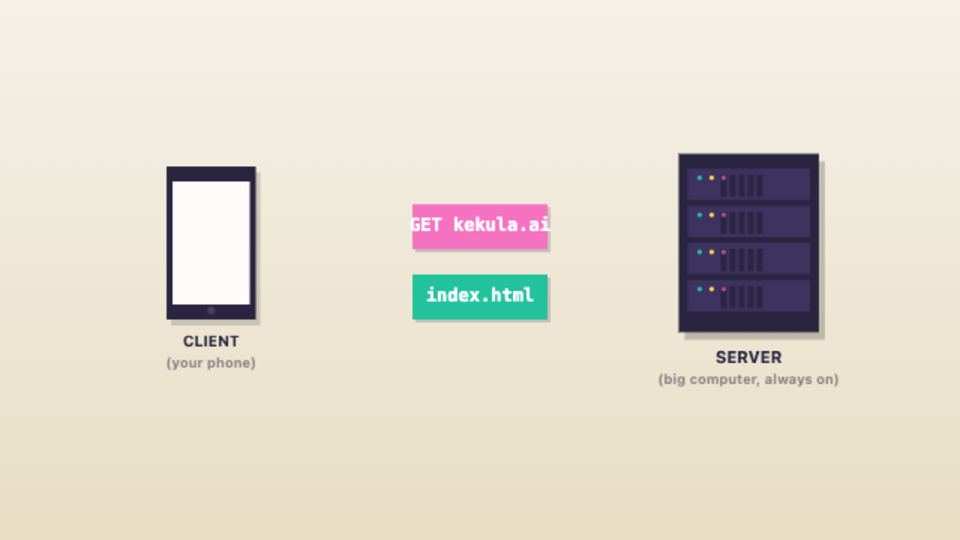
And your phone? That's the client. The asker. See those arrows? Pink one going out — that's your phone asking. Green one coming back — that's the server answering. Ask, answer. Ask, answer. That's basically the whole internet right there.
Watch this little pink note fly across. That's a request — basically a polite message from your phone saying "hey, please send me whatever lives at kekula.ai." The URL? That's just the address, like a house number for files on the internet.
And here come the files, zooming back. The server grabs them off its disk and ships them over as bytes — yep, just numbers, like we talked about before. Every file you see flying past is really just a long stream of ones and zeros showing up on your phone.
Your turn to play. Pick any of those URLs and watch what happens. The pink packet zips out asking for that address. Then the green one comes back loaded with files. Try a different one. Same dance, every single time.
Okay, peek inside one of those files. The big important one is called HTML. And honestly? It's just text. Look at it — words inside little pointy brackets. Those bracket-things are called tags, and each one tells your phone what to draw and where.
Watch how this works. See the highlight jumping around? Each tag on the left turns into a real thing on the right. h1 becomes a big heading. p becomes a paragraph. img puts a picture there. button gives you something to click. Tag in, shape out.
Try it yourself. Hover over any tag down there and watch what lights up on the page. Poke around. Which tag makes the heading? Which one becomes the picture? Once you see it, you can't unsee it — every page is just tags doing their thing.
Here's a fun bit. The HTML doesn't actually contain the cat picture. It just says "hey, the cat is over there at cat dot jpg." So your phone has to send another request. And another. One request per file, all flying back from the server.
Now your phone has all the pieces. The HTML, the picture, the styles. And it stitches them together — like building a Lego set from instructions. The page you see? Your phone literally drew it, right there, in a fraction of a second.
You're not the only one asking. Right now, all over the world, thousands of phones are pestering this same server. Look at all those little dots flying back and forth. The server just keeps calmly answering, every single one.
Let's lock it in. URL — just an address. Server — the always-on computer holding the files. Client — that's you, asking. And HTML — text with tags that shape what you see. Put it together and that's a website. No magic. Just files moving around.
Look how far we've come. Computers, data, networks, websites — you get the big picture now. But one mystery's left. When a computer actually does something — moves stuff, makes choices — what's it really following? That's a program. Coming up next.
Topics
Ready to try it yourself?
A Website Is Just Files is a hands-on interactive video — watch it, then play with the idea live in your browser. Free, no sign-up.
Open in Kekula →